


When we develop websites, sometimes we need to work with custom code to gain a specific functionality on the website. Carefulness is very important when we use custom code. Here if you did any mistakes it’ll break your website. In this article, I’ll show you How to Add Custom codes in WordPress properly.
Add Custom PHP Code with “Code Snippets”
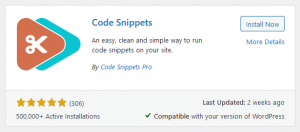
Code Snippets plugin can help you to publish custom codes on your site. See our step-by-step guide How to install a plugin properly (Article Coming Soon).
With this plugin, you can professionally publish custom code without a child theme. You can publish custom PHP codes, insert custom PHP codes in <header>, <footer>, & <body> tags. You can also use javascript code <script> tag on your header footer section.
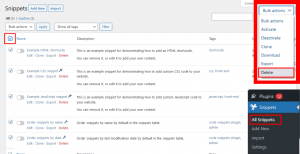
After installation, Go to the plugin page (under Plugins» Snippets). To working process not complicated delete all default snippets by clicking the bulk select checkbox then press (Bulk Action » Delete) button.
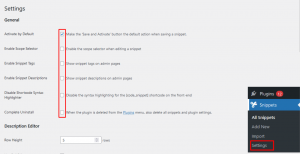
After that go to (under Plugins» Snippets» Settings) and make sure to uncheck all general settings except the first one. These 2 settings can make the user interface not complicated.
How to Publish Custom Code?
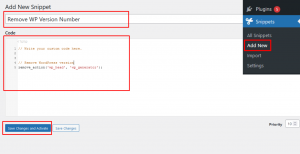
To publish any custom PHP code, go to (under Plugins» Snippets» Add new) and set the name of your snippets after that write/pest your custom code in the middle of the box. And don’t forget to click the “Save Changes and Activate” button. In this way, you can publish an unlimited number of custom codes on your website.
That’s all. I hope this article helped you understand How to Add Custom PHP Code in WordPress with the Code Snippets plugin. Would you like to learn how to track user activity? Check out this article How to Track User Activity in WordPress with Security Audit Logs.
If you liked this article, please follow me on Facebook.

